
The short answer: Adobe Illustrator is still the industry standard, so choose it if you work in an agency, share files with large teams or need its advanced vector, type and plugin ecosystem. Affinity is the better value for freelancers, students and small studios: it covers most everyday design work and, since late 2025, Canva offers it as a single free app that combines vector, photo and layout tools.
Below we compare the two on features, cost, file compatibility and career value, then recommend which to use for your situation.
What Are We Comparing?
- Affinity (Designer, Photo and Publisher, now combined into one Affinity app by Canva): vector illustration, photo editing and page layout.
- Adobe Illustrator and Photoshop: the long-established vector and photo editing tools in Adobe Creative Cloud, sold by subscription.
Affinity vs Illustrator at a Glance
| Factor | Affinity | Adobe Illustrator |
|---|---|---|
| Price | Free app (some AI features need a paid Canva plan) | Monthly or yearly Creative Cloud subscription |
| Vector + photo + layout | All in one app | Separate apps (Illustrator, Photoshop, InDesign) |
| Learning curve | Gentler, easier for beginners | Steeper, but endless tutorials |
| Industry standard | Growing, common with freelancers | Yes, in most agencies and print houses |
| Plugins and add-ons | Limited | Very large ecosystem |
| Computer needed | Runs well on modest machines | Heavier, prefers a strong computer |
Where Affinity Shines
- Vector and raster in one place. You can draw vectors, edit photos and lay out pages without switching apps.
- Easy to learn. Many designers find it more intuitive than Illustrator, especially when starting out.
- Light on hardware. It runs smoothly on older or less powerful laptops, which matters for many freelancers.
- Cost. No subscription for the core app, so there is no monthly bill in dollars to keep up with.
- Good enough for most client work. Logos, social media graphics, flyers, posters, brochures and UI mock-ups, with export to SVG, PDF, EPS and PNG.
Where Adobe Still Has the Edge
- Industry standard. Most agencies, print houses and large clients work in Adobe and expect
.aiand.psdfiles. - Advanced features. Complex vector work, pattern tools, advanced typography and generative AI tools built into the workflow.
- Ecosystem. Illustrator, Photoshop, InDesign, After Effects and Adobe Fonts all work together, which helps multi-discipline teams.
- Plugins and learning resources. More plugins, templates, tutorials and community answers than any other design software.
Is Affinity Industry Standard?
Not yet. Adobe remains the default in agencies, print production and big in-house teams, so if you want a job at an agency, learn Illustrator and Photoshop. Affinity is, however, widely accepted for freelance and small-business work, because clients care about the final logo, PDF or print file, not the app that made it.
The practical answer for many designers is to learn both: Affinity for your own projects and Adobe for jobs and collaborations that require it.
Can Affinity Open Illustrator and Photoshop Files?
Partly. Affinity opens .psd files and can import .ai files that were saved with PDF compatibility, and it exports to common formats such as PDF, SVG and EPS. Complex files with Adobe-only effects may not come through perfectly, so check them before you promise a client an edited Adobe file.
Which Should You Choose?
Freelancers, students and small businesses: start with Affinity. It costs nothing to begin, runs on most laptops and handles logos, social media designs and print work well.
Agency designers and those aiming for an agency career: use Adobe Illustrator and Photoshop. Employers expect them, and you will collaborate on shared Adobe files.
Mixed work (vector, photo and layout) on a budget: Affinity's single app covers all three without three separate subscriptions.
Large teams that need plugins, shared libraries and enterprise support: Adobe Creative Cloud is still the most complete ecosystem.
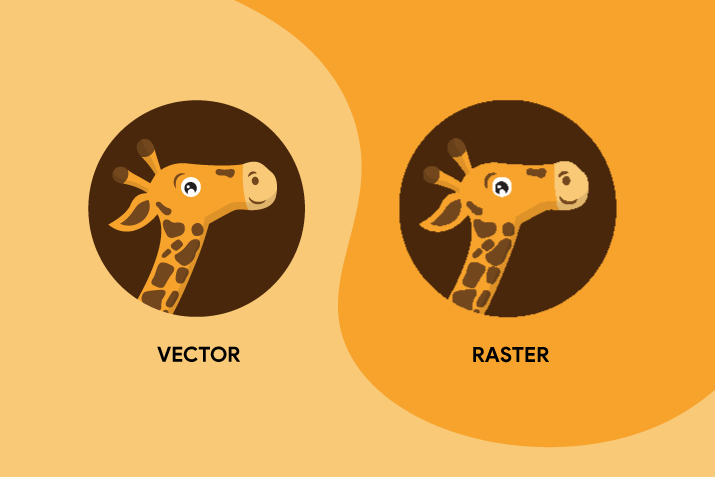
Whichever you pick, the tool matters less than the skills. Learn the difference between raster and vector graphics, practise typography, and build a portfolio that shows your best work.
Affinity vs Illustrator: FAQs
Is Affinity really free now?
Yes. Since late 2025 Canva has offered Affinity as a free app that combines the old Designer, Photo and Publisher tools. Some AI features need a paid Canva plan.
Is Affinity better than Illustrator for beginners?
For most beginners, yes. It is easier to learn, free to start and runs on modest computers. Move to Illustrator later if your job or clients require it.
Can I use Affinity for professional client work?
Yes. Logos, brand assets, social media graphics and print files made in Affinity are fully professional. Just confirm the file formats your client or printer needs.
Should I learn Illustrator to get a design job in Kenya?
If you are aiming for an agency or a large in-house team, yes, because most still work in Adobe. Our guide on how to become a graphic designer in Kenya covers the other skills employers look for.
Final Verdict
There is no single best tool, only the best tool for your work. Affinity is now a serious, professional option that costs nothing to start. Adobe Illustrator and Photoshop remain the safest choice when you need the industry standard, deep features and smooth collaboration. Choose based on your work, budget, team and career plans.

Comments 0
No comments yet. Start the conversation.